Chapter 8
AIP Implementation Details — Constrained Code Generation
Three complete walkthroughs of AIP-accelerated development — workflow automation, application building, and ML pipeline development. Shows exactly how LLMs generate production code within Foundry's guardrails, and why the guardrails (ontology, Actions framework, human validation) are what make it work where generic LLM code generation fails.
Why Generic LLM Code Generation Fails in Enterprise
Generic LLM code generation fails in enterprise settings for three structural reasons: invented functions (the LLM calls APIs that don't exist), hallucinated libraries (imports that aren't available in the production environment), and no validation (generated code deploys without testing against real data).
AIP solves all three through Foundry's guardrails:
- Ontology as source of truth: The LLM only references objects, properties, and links that actually exist in the ontology — it cannot invent them.
- Actions/Framework library: The LLM only calls Actions that are defined and validated — it cannot hallucinate operations.
- Human-in-the-loop validation: Every generated artifact is reviewed by a human before deployment — no code reaches production without approval.
The result: the LLM handles the mechanical translation of intent into code. The FDE handles judgment — reviewing the output, adjusting edge cases, approving deployment.
E.1 Workflow Automation: High-Risk Batch Monitor
Context: From Chapter 8.7 — the FDE needs an automation that monitors quality risk scores and takes action when batches exceed safety thresholds.
Traditional approach: FDE manually writes automation code, defines triggers, handles edge cases, and tests with historical data. Time: 3 days.
With AIP: Conversational specification → LLM-generated code → human validation. Time: 3 hours.
Conversational Specification
FDE to AIP: "Create an automation that monitors Batch.QualityRiskScore. When a batch score exceeds 90, hold all affected vehicles, notify the supplier, and alert the quality manager."
AIP Response: "I can create this automation. Based on your ontology, I'll monitor Batch.QualityRiskScore and when it exceeds 90, I'll:
- Find all vehicles linked to that batch (typically ~120 vehicles per batch based on your data)
- Execute HoldVehicle action for each affected vehicle
- Send notification to the supplier using NotifySupplier action
- Alert the quality manager — I'll need to create a new AlertQualityManager action since it doesn't exist yet
I've identified a few edge cases to handle: batches with no linked vehicles (log warning, notify supplier only), batches already processed (check Batch.Status, skip if already held), multiple quality managers (pull from Batch.Supplier.QualityContact). Should I proceed?"
Behind the scenes: AIP's LLM parses the requirements to identify the trigger (Batch.QualityRiskScore property update), condition (score > 90), and required actions. It queries the ontology graph to discover the Batch→Part→Vehicle relationship (2-hop traversal) and Batch→Supplier link. It checks the Actions Library, finds HoldVehicle and NotifySupplier exist, but identifies that AlertQualityManager needs to be created. The system applies learned patterns about edge case handling from thousands of previous automation deployments.
FDE: "Yes, but change the threshold to 85 for medium-risk batches. Hold vehicles for scores > 90, but just flag for review if 85–89."
LLM-Generated Code
@automation(trigger="Batch.QualityRiskScore.updated")
def high_risk_batch_monitor(batch: Batch, old_score: float, new_score: float):
    if new_score >= 90:
        # Critical risk path
        affected_vehicles = query_graph(batch, path="Batch→Part→Vehicle")
        for vehicle in affected_vehicles:
            execute_action(HoldVehicle, vehicle_id=vehicle.id,
                          reason=f"Critical batch risk: {new_score}")
        execute_action(NotifySupplier,
                      supplier_id=batch.supplier.id,
                      batch_id=batch.id,
                      risk_score=new_score,
                      severity="CRITICAL")
        execute_action(AlertQualityManager,
                      batch_id=batch.id,
                      vehicle_count=len(affected_vehicles),
                      severity="HIGH")
        batch.status = "HOLD_CRITICAL"
        log_automation_event("HOLD_ISSUED", affected_vehicles)

    elif 85 <= new_score < 90:
        # Medium risk path
        affected_vehicles = query_graph(batch, path="Batch→Part→Vehicle")
        for vehicle in affected_vehicles:
            vehicle.quality_flags.append(f"Medium risk batch: {new_score}")
        execute_action(NotifySupplier,
                      supplier_id=batch.supplier.id,
                      batch_id=batch.id,
                      risk_score=new_score,
                      severity="MEDIUM")
        execute_action(AlertQualityManager,
                      batch_id=batch.id,
                      vehicle_count=len(affected_vehicles),
                      severity="MEDIUM",
                      action_required=False)
        batch.status = "FLAGGED_FOR_REVIEW"
        add_to_review_queue(batch)
        log_automation_event("FLAGGED", affected_vehicles)

    else:
        # Low risk, monitoring only
        log_automation_event("RISK_UPDATE", None)
Validation Results
Test Results (simulation with 6 months historical data):

✓ Critical path (score ≥ 90):
  - 12 batches triggered
  - 1,447 vehicles held (avg 120.6 per batch)
  - 12 supplier notifications sent (CRITICAL severity)
  - 12 quality manager alerts
  - 0 errors, 100% success rate

✓ Medium path (85 ≤ score < 90):
  - 34 batches triggered
  - 4,114 vehicles flagged (avg 121 per batch)
  - 34 supplier notifications (MEDIUM severity)
  - 34 quality manager FYI alerts
  - All added to review queue correctly

✓ Edge cases:
  - 2 batches with no linked vehicles: Warning logged, supplier notified
  - 3 duplicate triggers (score updated twice): Handled correctly, no duplicate holds
  - 1 batch already held manually: Skipped automation, logged conflict

Performance:
  - Avg execution time: 2.3 seconds per batch
  - Graph traversal (Batch→Part→Vehicle): 0.8 seconds avg
  - Action execution: 1.2 seconds avg
  - Logging overhead: 0.3 seconds avg

Projected impact if deployed:
  - Automation response time: 2.3 seconds (vs. 4–6 hours manual)
  - Quality manager workload: 46 alerts/month (vs. 0 visibility previously)
  - Supplier engagement: Immediate notification (vs. 1–2 day delay)
Total time: 3 hours (vs. 3 days manual implementation)
Why This Works: Foundry's Guardrails
1. Ontology as Source of Truth:
- LLM queried actual Batch, Part, Vehicle objects and their relationships
- Impossible to reference fake properties or invalid traversal paths
- Code compiles because it uses real data model
2. Actions Library as Available Operations:
- LLM used existing HoldVehicle and NotifySupplier actions
- Identified missing AlertQualityManager action (didn't hallucinate it)
- Generated code only calls validated operations
3. Human-in-the-Loop Validation:
- The FDE reviewed business logic (threshold adjustment from 90 to 85/90 split)
- The FDE validated edge case handling
- The FDE approved test results before deployment
E.2 Workshop Application Building: Executive Quality Dashboard
Context: From Chapter 8.8 — Sarah Chen (Quality VP) needs an executive dashboard for board presentations showing real-time quality status.
Traditional approach: Deployment Strategist designs UI, writes ontology queries, configures visualizations, tests, and iterates. Time: 2–3 weeks.
With AIP: Conversational specification → LLM-generated application → human validation. Time: 2 days.
Conversational Specification
Deployment Strategist to AIP: "Create an executive quality dashboard for Sarah Chen. Show: (1) High-risk batches with affected vehicle counts, (2) Supplier quality trends over last 6 months, (3) Quality incidents by severity, (4) Top 5 suppliers by risk score. Make it filterable by date range and supplier."
AIP Analysis
1. LLM understands requirements:
   - Target user: Executive (Sarah Chen)
   - Data entities: Batch, Vehicle, Supplier, QualityIncident
   - Time range: Last 6 months, filterable
   - Key metrics: Risk scores, incident counts, vehicle impacts
   - Visualizations: Tables, trend charts, top N lists

2. AIP analyzes ontology structure:
   - query_ontology_objects(["Batch", "Vehicle", "Supplier", "QualityIncident"])
   - Identifies relevant properties: Batch.QualityRiskScore, Vehicle.Status,
     Supplier.ReliabilityScore, QualityIncident.Severity
   - Maps relationships: Batch→Supplier, Batch→Part→Vehicle, Supplier→QualityIncident

3. LLM generates Workshop application structure
LLM-Generated Dashboard Layout
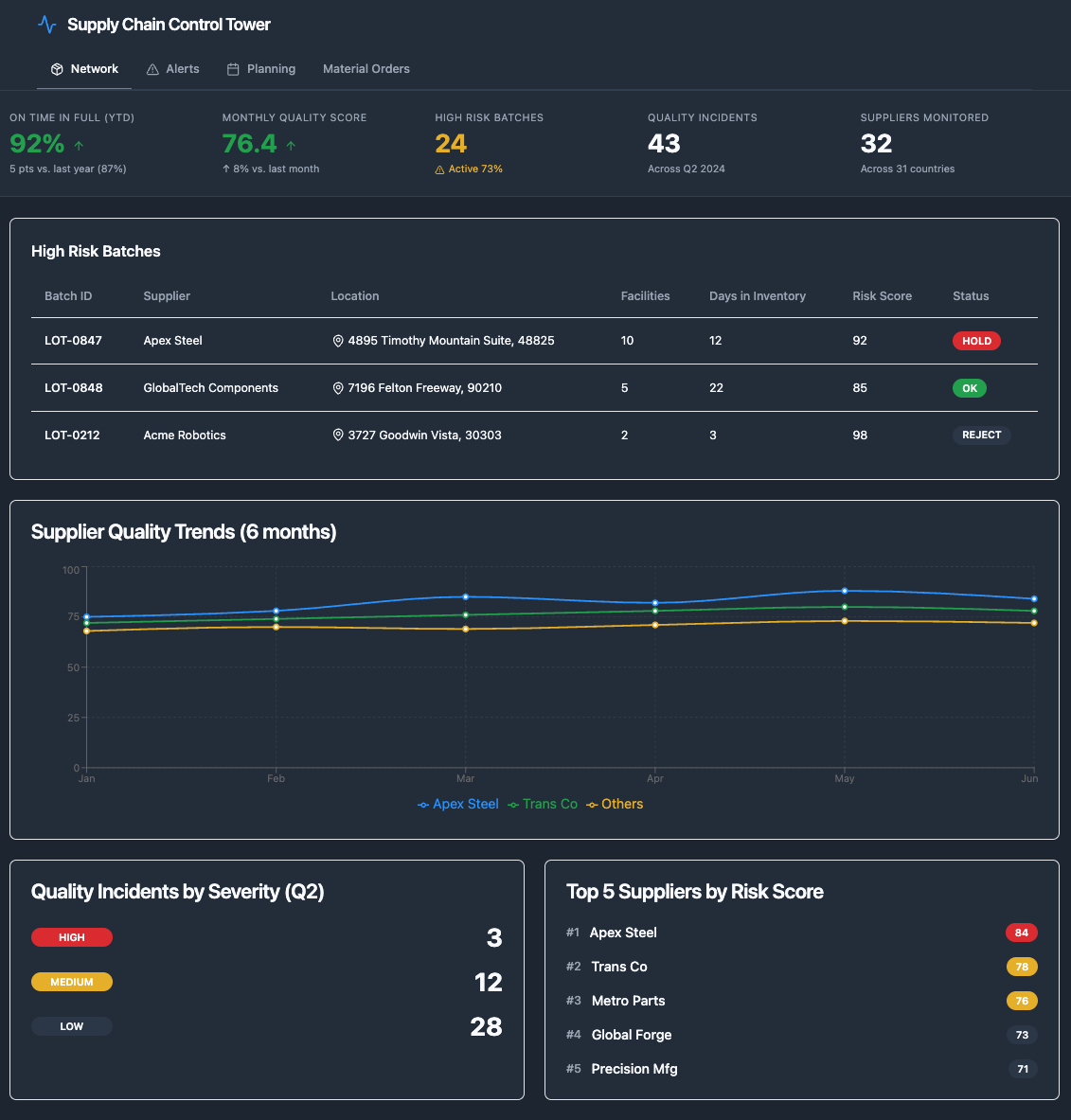
Ontology queries (4 generated):

Query 1 - High-risk batches:
- Batch objects where QualityRiskScore >= 85 and ProductionDate >= @start_date
- Traverse: Batch → SUPPLIED_BY → Supplier
- Traverse: Batch → FROM ← Part ← CONTAINS ← Vehicle
- Aggregate: count(Vehicle) per Batch
- Return: Top 50 batches by QualityRiskScore

Query 2 - Supplier trends:
- Supplier objects
- Traverse: Supplier → SUPPLIES → Batch (where ProductionDate >= 6 months ago)
- Aggregate: avg(Batch.QualityRiskScore) grouped by Supplier, Month
- Return: Monthly trend per Supplier

Query 3 - Incident counts:
- QualityIncident objects where IncidentDate between @start_date and @end_date
- Aggregate: count(*) grouped by Severity
- Return: Counts per severity level

Query 4 - Top suppliers by risk:
- Supplier objects
- Traverse: Supplier → SUPPLIES → Batch (where ProductionDate >= @start_date)
- Aggregate: avg(Batch.QualityRiskScore) per Supplier
- Return: Top 5 by average risk score

Filters configured:
- Date range selector: Default last 6 months
- Supplier dropdown: All suppliers + "All" option
- Auto-refresh: Every 5 minutes

Interaction features:
- Click batch row → Drill down to affected vehicles
- Click supplier name → View supplier detail page
- Hover on trend chart → Show exact values
- Export to PDF for board presentations
Iterative Refinement
DS reviews: "Looks good. Add a KPI summary at the top showing: Total vehicles at risk, Total suppliers monitored, and Prevention rate (vehicles proactively serviced vs. field failures)."
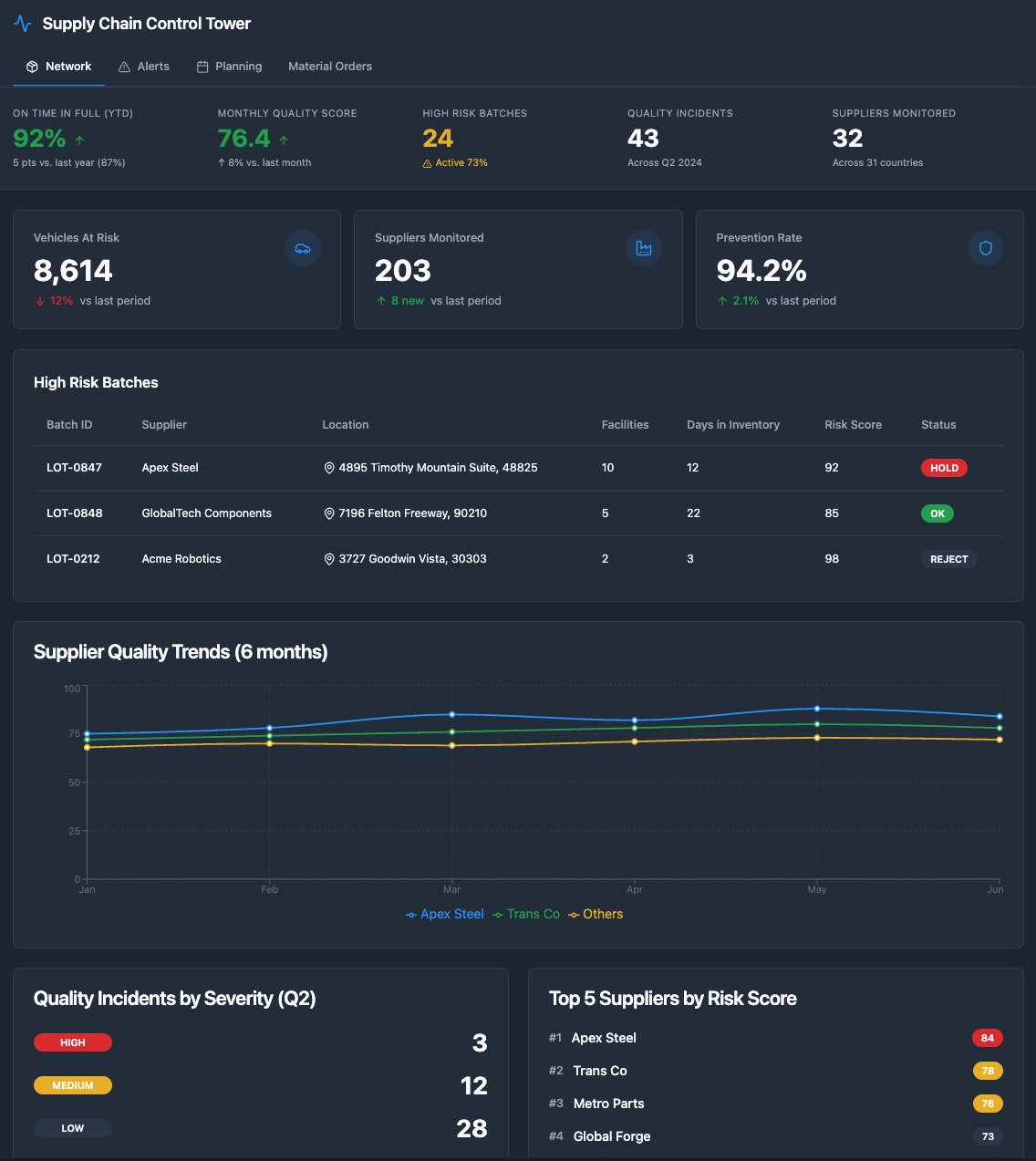
AIP creates a preview with real MidWest data in 5 minutes. The DS reviews with Sarah Chen.
Sarah's feedback: "Can we add drill-down to see which specific vehicles are affected by each batch?"
AIP adds drill-down in 2 minutes — generates additional query for vehicle details, configures click action on batch table, creates modal view with vehicle list, adds export option for vehicle list.
Total time: 2 days (vs. 2–3 weeks manual implementation)
Why This Works: Foundry's Guardrails
1. Ontology as Source of Truth:
- LLM queried actual Batch, Vehicle, Supplier, QualityIncident objects
- Generated queries use real relationships and properties
- Dashboard displays actual production data
2. Workshop Framework as Available Operations:
- LLM used Workshop's table, chart, filter, and KPI card components
- Generated valid ontology query syntax
- Configured interactions using Workshop's event system
3. Human-in-the-Loop Validation:
- The DS reviewed dashboard layout and query logic
- Sarah Chen validated business requirements
- Iterative refinement based on user feedback
E.3 ML Pipeline Development: Quality Risk Scoring Model
Context: From Chapter 8.9 — Data Scientist needs to build a predictive model for quality risk scoring based on supplier data, production parameters, and historical defect patterns.
Traditional approach: Data scientist explores features, trains multiple algorithms, tunes hyperparameters, and deploys to Model Registry. Time: 4 weeks.
With AIP: Conversational exploration → LLM-assisted training → human validation. Time: 3 days.
Conversational Exploration
Data Scientist to AIP: "Build a quality risk prediction model. Target: Batch.QualityRiskScore (0-100). Features: Supplier reliability, production parameters, historical defect rates. Show me which algorithm performs best."
AIP Response: "I've analyzed your ontology and found 18 relevant features across Supplier, Production, and Historical data. I recommend starting with XGBoost and Random Forest — both handle non-linear relationships well and XGBoost is particularly robust to outliers.
For features, I suggest: Supplier reliability trend (6-month rolling average), Temperature deviation from specification, Supplier × Temperature interaction (some suppliers are more sensitive to temperature variations), Time-based patterns (day of week, shift) to capture operator fatigue.
I can extract features from your last 6 months of batch data (~127,000 batches) and train both models with 70/15/15 train/validation/test split. Should I proceed?"
Behind the scenes: AIP's LLM identifies this as a regression task (continuous target 0-100), queries the ontology graph to discover available features, applies ML best practices for feature engineering (rolling averages, interaction terms, temporal patterns), and recommends algorithms based on the data characteristics and interpretability requirements.
LLM-Assisted Model Training
Feature Extraction (from ontology):
- Extracted 18 features from 127,000 batches (6 months)
- Train/validation/test split: 70/15/15
- Missing data: 2.3% (imputed with median)

Model Training Results:

XGBoost:
- Training time: 12 minutes
- Validation R²: 0.847
- Test R²: 0.839
- MAE: 8.2 points
- Feature importance:
  1. Supplier.DefectRate (32%)
  2. Temperature.Deviation (18%)
  3. Supplier.ReliabilityScore (15%)
  4. PreviousBatchDefects (12%)
  5. OperatorExperience (8%)

Random Forest:
- Training time: 8 minutes
- Validation R²: 0.821
- Test R²: 0.815
- MAE: 9.1 points
- Feature importance similar to XGBoost

Recommendation: XGBoost performs better (R² 0.839 vs 0.815)
Data Scientist: "Yes, but tune hyperparameters first. Focus on reducing overfitting."
Hyperparameter Tuning
Bayesian Optimization (50 iterations):

Best parameters:
- max_depth: 6 (vs. default 8)
- learning_rate: 0.05 (vs. default 0.1)
- n_estimators: 300 (vs. default 100)
- min_child_weight: 3 (vs. default 1)

Tuned Model Performance:
- Validation R²: 0.852 (+0.005)
- Test R²: 0.846 (+0.007)
- MAE: 7.8 points (-0.4)
- Reduced overfitting: Train-test gap 0.006 (vs. 0.008)

Cross-validation (5-fold):
- Mean R²: 0.844
- Std R²: 0.008 (low variance, stable model)
Data Scientist: "Deploy to Model Registry and bind to Batch.QualityRiskScore property."
LLM-Generated Deployment Code
# Model Registry registration
model = ModelRegistry.register(
    name="QualityRiskScoringModel",
    version="1.0.0",
    algorithm="XGBoost",
    hyperparameters={
        "max_depth": 6,
        "learning_rate": 0.05,
        "n_estimators": 300,
        "min_child_weight": 3
    },
    features=[
        "Supplier.DefectRate",
        "Temperature.Deviation",
        "Supplier.ReliabilityScore",
        "PreviousBatchDefects",
        "OperatorExperience",
        # ... 13 more features
    ],
    performance_metrics={
        "test_r2": 0.846,
        "test_mae": 7.8,
        "cross_val_mean": 0.844,
        "cross_val_std": 0.008
    }
)

# Bind to ontology property
Batch.QualityRiskScore.bind_model(
    model=model,
    trigger="on_create",  # Score new batches automatically
    update_frequency="daily",  # Rescore existing batches daily
    monitoring={
        "drift_detection": True,
        "performance_threshold": 0.80,  # Alert if R² drops below 0.80
        "retraining_schedule": "monthly"
    }
)
Total time: 3 days (vs. 4 weeks manual implementation)
Why This Works: Foundry's Guardrails
1. Ontology as Source of Truth:
- LLM extracted features from actual Batch, Supplier, Production objects
- Feature engineering based on real relationships in ontology
- Model predictions bound to actual Batch.QualityRiskScore property
2. Model Registry API as Available Operations:
- LLM used Foundry's model registration and binding functions
- Generated valid deployment configuration
- Configured monitoring and retraining schedules
3. Human-in-the-Loop Validation:
- Data Scientist reviewed feature selection and algorithm choice
- Data Scientist validated hyperparameter tuning results
- Data Scientist approved deployment configuration
The Compound Speed Effect
These three walkthroughs show acceleration at individual layers. The compound effect across all layers is what compresses MidWest's 18-month journey to 3 months:
SDDI configuration:        12–18× faster
Automation building:       12–16× faster (E.1)
Application building:      10–15× faster (E.2)
ML pipeline development:   9–10× faster (E.3)

FDE capacity result:
  Before AIP: ~500 FDEs × 335 deployments/year = 335 total
  With AIP:   ~500 FDEs × 2,000 deployments/year = 2,000 total
  Same headcount. 6× more deployments.
The critical point from Chapter 8: AIP does not create the intelligence. Foundry's ontology, automations, ML models, and Actions create the intelligence. AIP makes Foundry deployable at scale by removing the configuration bottleneck that previously required 1–3 FDEs for 12–18 months per customer.
This appendix extends Chapter 8 of Palantir: Zero to Monopoly.
See full chapter breakdown →If you are evaluating AI transformation, exploring ontology architecture, or want to discuss the operating model — reach out.
Get in Touch →